Sign in
Outlooking on Outlook - your answers are here
Outlook Global Technical Support Team Blog
Translate This Page
Translate this page
Powered by
Microsoft® Translator
Office Blog
You can find the
Office blog
right HERE
Options
Email Blog Author
RSS for posts
Atom
RSS for comments
OK
Search Blogs
Tags
.NK2
attachments
Calendar
calendaring
customize
documentation
free/busy
GPO
Group Policy
MAPI
MAPI properties
Meeting
meeting updates
meetings
modify
outlook
Outlook 2003
Outlook 2007
Outlook 2010
Outlook 2013
Outlook Anywhere
Outlook performance
permission
shared mailbox
tools
Archive
Archives
April 2013
(2)
March 2013
(1)
February 2013
(4)
December 2012
(1)
October 2012
(1)
June 2012
(1)
May 2012
(1)
February 2012
(1)
December 2011
(1)
November 2011
(1)
March 2011
(2)
January 2011
(1)
May 2010
(3)
April 2010
(1)
March 2010
(1)
February 2010
(3)
January 2010
(3)
December 2009
(1)
November 2009
(1)
October 2009
(1)
TechNet Blogs
>
Outlooking on Outlook - your answers are here
Posts
Subscribe via RSS
Sort by:
Most Recent
|
Most Views
|
Most Comments
Excerpt View
|
Full Post View
Outlooking on Outlook - your answers are here
GAL pictures not displaying? Checkpoints to resolve the issue
Posted
1 month ago
by
Sil.views
0
Comments
Part 1: The Setup This blog is split in two parts, first covering checkpoints for a correct setup for GAL pictures and the second Outlook client troubeshooting focused on Exchange Cached Mode. Setting pictures in Active directory is a great feature...
Outlooking on Outlook - your answers are here
The evolution of meeting notes in Outlook
Posted
1 month ago
by
Teresa Walker [MSFT]
0
Comments
An Outlook meeting has a notes area that can be used to store information related to the meeting. Although it may seem very convenient to add notes directly into the meeting, there are few things that you should consider before you do this. The meeting...
Outlooking on Outlook - your answers are here
Conflicting permission sets when working with shared or delegated folders
Posted
2 months ago
by
Abdias Ruiz [MSFT]
0
Comments
Outlook allows users to share folders so that others can interact with items in those folders. Additionally, a user can be configured as an Outlook Delegate, allowing him or her to manage specific tasks on your behalf, such as meeting related tasks. If...
Outlooking on Outlook - your answers are here
How to programmatically read additional mailboxes from an existing mail profile
Posted
2 months ago
by
ThomasNoack
0
Comments
Reading additional mailboxes from a given e-mail profile is much simpler than adding them. After retrieving all installed providers for the MSEMS service, just loop thru all providers and search for the ones with PR_PROFILE_TYPE set to the value 2. ...
Outlooking on Outlook - your answers are here
How to programmatically add additional mailboxes to an existing mail profile
Posted
2 months ago
by
ThomasNoack
2
Comments
There's a well-known knowledge base article which describes on how to programmatically add mailboxes to a given e-mail profile: 171636 How to add more Exchange mailboxes to a MAPI profile http://support.microsoft.com/kb/171636/EN-US This code has been...
Outlooking on Outlook - your answers are here
Display search results as I type when possible: Online Mode
Posted
3 months ago
by
Sil.views
0
Comments
I would like to take the chance of describing the function of " word wheeling " in Outlook Instant Search The function “Display search results as I type when possible”(word wheeling) , can be a little ambiguous. You may wonder what are...
Outlooking on Outlook - your answers are here
New Outlook Calendar best practices guidance for Outlook 2007, Outlook 2010, and Outlook 2013
Posted
3 months ago
by
Abdias Ruiz [MSFT]
2
Comments
If you frequently work with meetings in Outlook, it is very likely that at some point you read the Outlook meeting requests: Essential do’s and don’ts article. However, you probably noticed that this older document only generally applies to...
Outlooking on Outlook - your answers are here
Clarification on Outlook 2010 and Additional Exchange Account supportability
Posted
5 months ago
by
Alina Streang
0
Comments
General information: Starting with Outlook 2010, we introduced a new feature that allows users to add Multiple Microsoft Exchange accounts to the same profile: http://office.microsoft.com/en-gb/outlook-help/what-s-new-in-microsoft-outlook-2010...
Outlooking on Outlook - your answers are here
Change first day of the week in Outlook (FirstDov) through automatic script!
Posted
7 months ago
by
Alex Coltea
0
Comments
If you want to change the calendar Work Week for example from “ Sunday until Thursday” you can do that automatically by simple running the below sample script. We took some time and we wrote this sample code which will help you to deploy this...
Outlooking on Outlook - your answers are here
Understanding Meeting Updates
Posted
11 months ago
by
FlorinaB
21
Comments
Since working with the Outlook calendar, and more specifically with meetings, it is very likely that the majority of us have encountered situations in which updates to meetings are not triggering the same type of message. And what I mean by this is...
Outlooking on Outlook - your answers are here
“Download Headers Only vs. Download Headers in Outlook”
Posted
11 months ago
by
Alina Streang
2
Comments
If there are users in your company that have huge mailboxes and in addition need to log on different machines all the time, you may consider enabling “Download Headers” in order to avoid spending a lot of time doing a full sync of the information...
Outlooking on Outlook - your answers are here
How to share color categories for Outlook 2010
Posted
over 1 year ago
by
FlorinaB
11
Comments
Since there aren't many written sources for sharing categories, I thought it might be useful to discuss a bit on this topic and how can this be achieved in Outlook 2010. As a background information for versions prior to Outlook 2007 category information...
Outlooking on Outlook - your answers are here
How to copy all Signatures or .NK2 files from Outlook 2003 to Outlook 2007!
Posted
over 2 years ago
by
Alex Coltea
0
Comments
For example if you migrated to Outlook 2007 and you also received a new machine, you want to make a back-up of the NK2 files and also to your signatures before the upgrade. With this sample .vbs logoff script you can copy all these information from this...
Outlooking on Outlook - your answers are here
How to deploy a PRF file in your organization using a .vbs file (logon script)!
Posted
over 2 years ago
by
Alex Coltea
0
Comments
If you want to deploy a PRF file to all your users you can use this sample .vbs code. I took some time and I wrote this sample code which will help you to deploy a PRF to all your users, but before doing this please read the statement below: “MICROSOFT...
Outlooking on Outlook - your answers are here
When you export a personal distribution list from Outlook to Excel, the contacts information is not displayed.
Posted
over 2 years ago
by
Vlad Miclaus
0
Comments
Recently I monitored the behavior when working with DL’s and trying to export them into Excel. Let’s take into account the following scenario: You are creating a personal distribution list in Outlook (no matter which version) and you...
Outlooking on Outlook - your answers are here
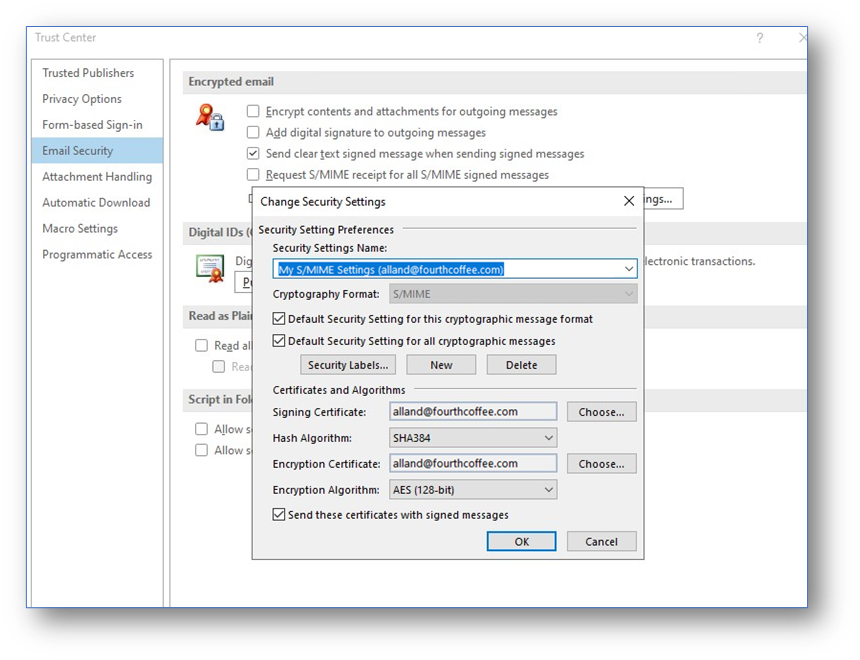
Usage of the “Do not check e-mail address against address of certificates being used” in Outlook 2010
Posted
over 2 years ago
by
Vlad Miclaus
0
Comments
If a user sends out an e-mail from his e-mail address ( user@contoso.com ) and digitally signs the e-mail using a different e-mail address ( user@test.contoso.com ) --> the receiver will see the signature as trusted. This happens although the signing...
Outlooking on Outlook - your answers are here
Outlook 2010: Error adding more than 30 calendars in the Calendar module
Posted
over 2 years ago
by
Catalic
0
Comments
Here is a good to know information about the Outlook 2010 Calendar module. If you got used to working with more than 30 calendars at the same time, then this blog will definitely help you further. I know this limitation was not present under Outlook...
Outlooking on Outlook - your answers are here
Useful tools while troubleshooting Outlook issues (3) - MFCMAPI
Posted
over 3 years ago
by
radums
1
Comments
Continuing with the tools series I will briefly describe MFCMAPI tool in this post. MFCMAPI is one of most complex tools that we can use to investigate Outlook issues and not only. Taking in consideration the complexity of this tool, I will not...
Outlooking on Outlook - your answers are here
Useful tools while troubleshooting Outlook issues (2) Process Monitor
Posted
over 3 years ago
by
radums
0
Comments
Another tool that can be useful while trying to solve an Outlook issue is Process Monitor. Download link: http://technet.microsoft.com/en-us/sysinternals/bb896645.aspx Process Monitor is an advanced monitoring tool for Windows that shows real...
Outlooking on Outlook - your answers are here
Useful tools while troubleshooting Outlook issues (1) – Process Explorer
Posted
over 3 years ago
by
radums
0
Comments
The following blog post will give an overview of common tools used to troubleshoot Outlook issues. I will focus in this post on Process Explorer. I will not cover all features that Process Explorer has, but I will try to highlight some of them that you...
Outlooking on Outlook - your answers are here
Special characters in an attachment filename get replaced with blank spaces when opened from Outlook
Posted
over 3 years ago
by
radums
0
Comments
Scenario: User A sends an email message with an attachment to User B. The attachment name has the following filename: Name.a.b.c.txt. When User B receives the attachment and opens it from Outlook he will see thatdots (“.”) from the file...
Outlooking on Outlook - your answers are here
Some best practices when working with Outlook Calendar
Posted
over 3 years ago
by
radums
0
Comments
Prerequisites 1.1 Make sure that you are up-to-date! 1.1.1 Outlook For administrators is very important keep all Outlook clients updated with the latest Microsoft cumulative updates for Office/Outlook. 1.1.2 Exchange Exchange server...
Outlooking on Outlook - your answers are here
Information on AutoComplete feature in Outlook
Posted
over 3 years ago
by
radums
1
Comments
AutoComplete feature in Outlook and how it works: The nickname cache feature makes it quicker to resolve a name for a recipient that you use on a regular basis. The feature has changed a little over the years with the different versions of Outlook...
Outlooking on Outlook - your answers are here
Deploying Junk E-mail Safe Senders lists in Outlook
Posted
over 3 years ago
by
CameliaA
1
Comments
We are all the time confronted with spam and junk emails and most of us appreciate the fact that “those” emails go into a special folder – the Junk E-mail folder. I will not go into explaining what Junk emails are all about, and I will not start...
Outlooking on Outlook - your answers are here
Retention policies in Outlook/ How are these working along with Auto Archiving feature
Posted
over 3 years ago
by
radums
2
Comments
How AutoArchive works in Outlook Outlook mailboxes grow as users create and receive items. To keep mailboxes manageable, users need another place to store - or archive - older items that are important but not frequently used. It is typically most...
Page 1 of 2 (31 items)
1
2